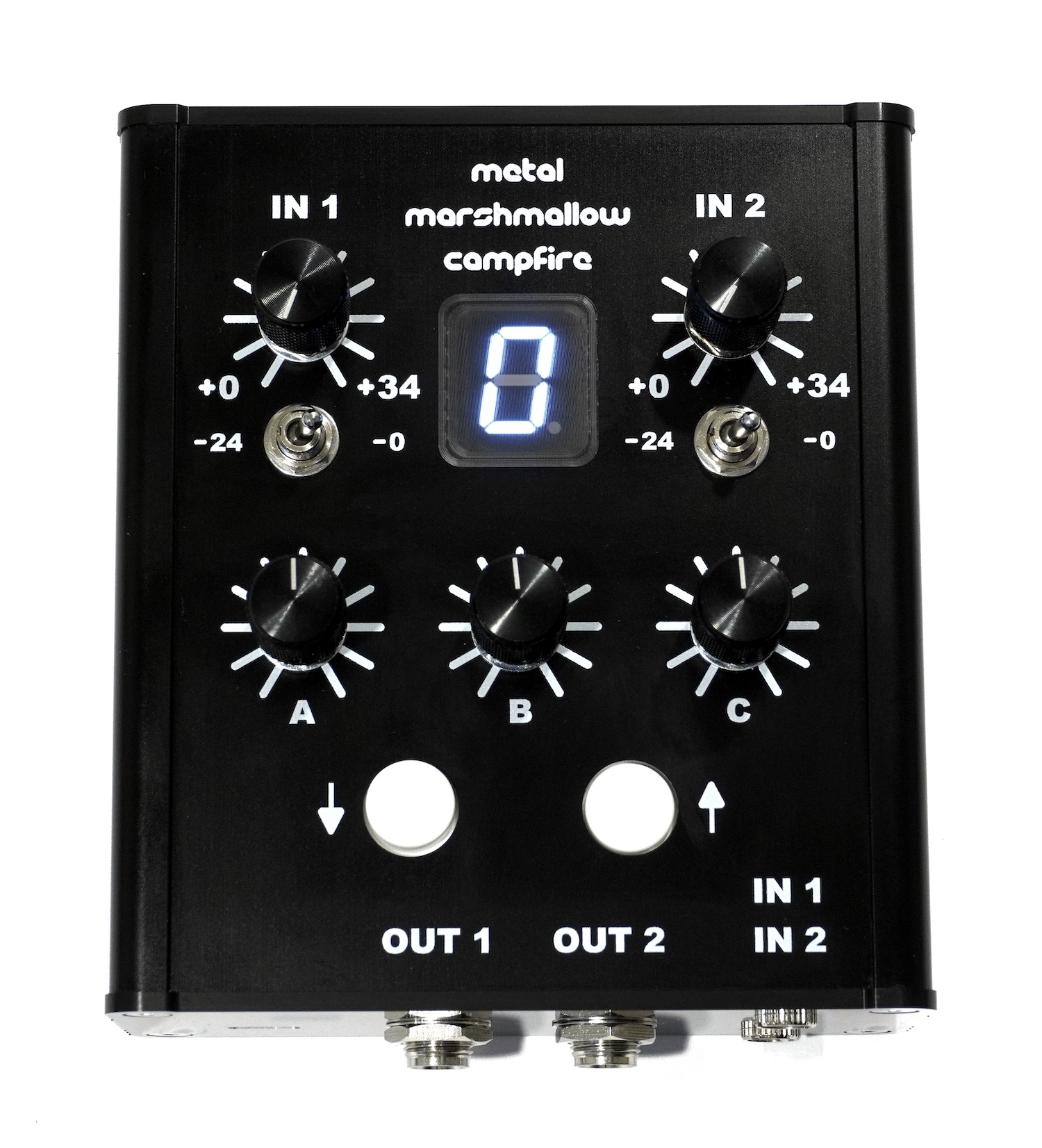
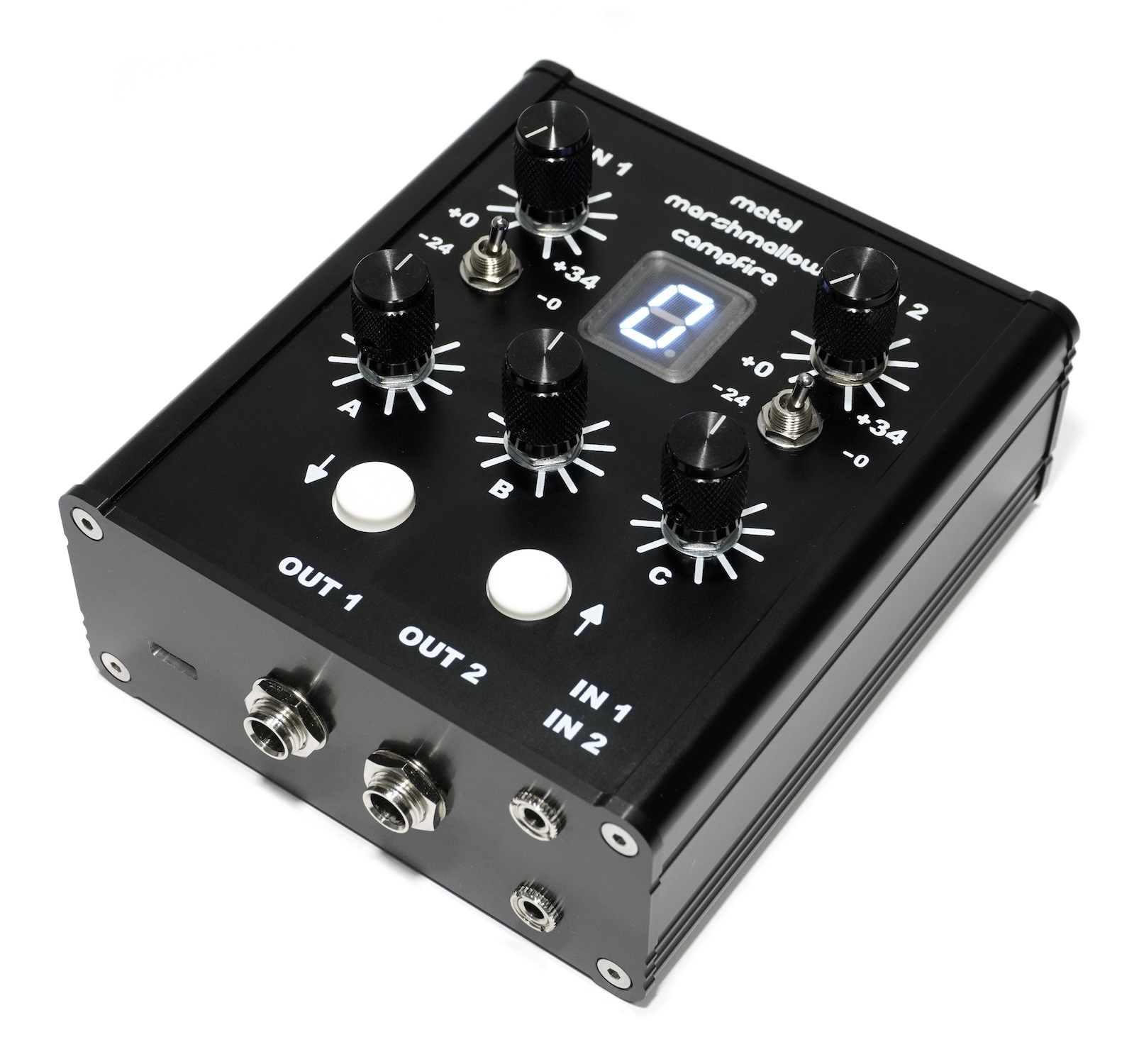
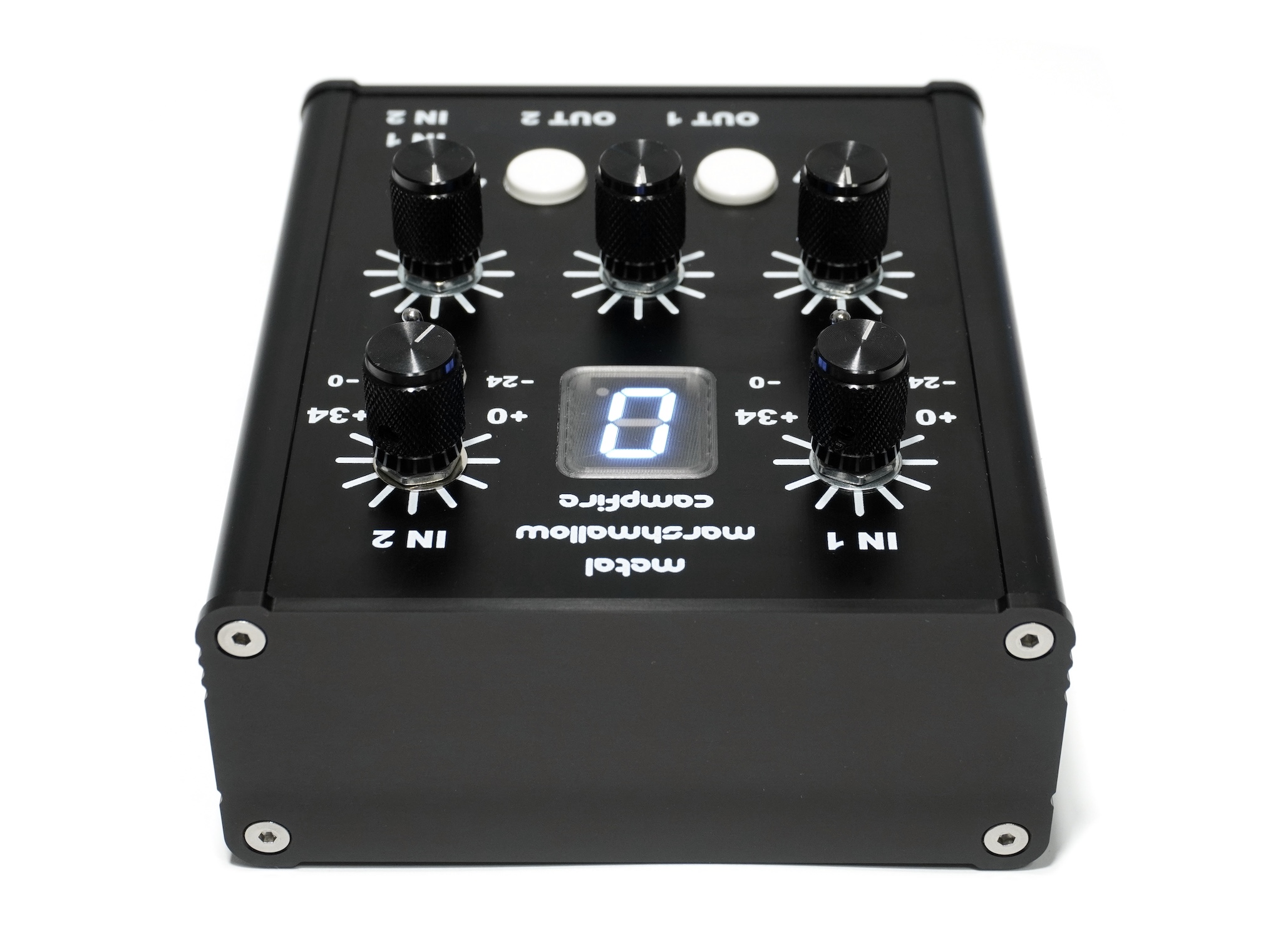
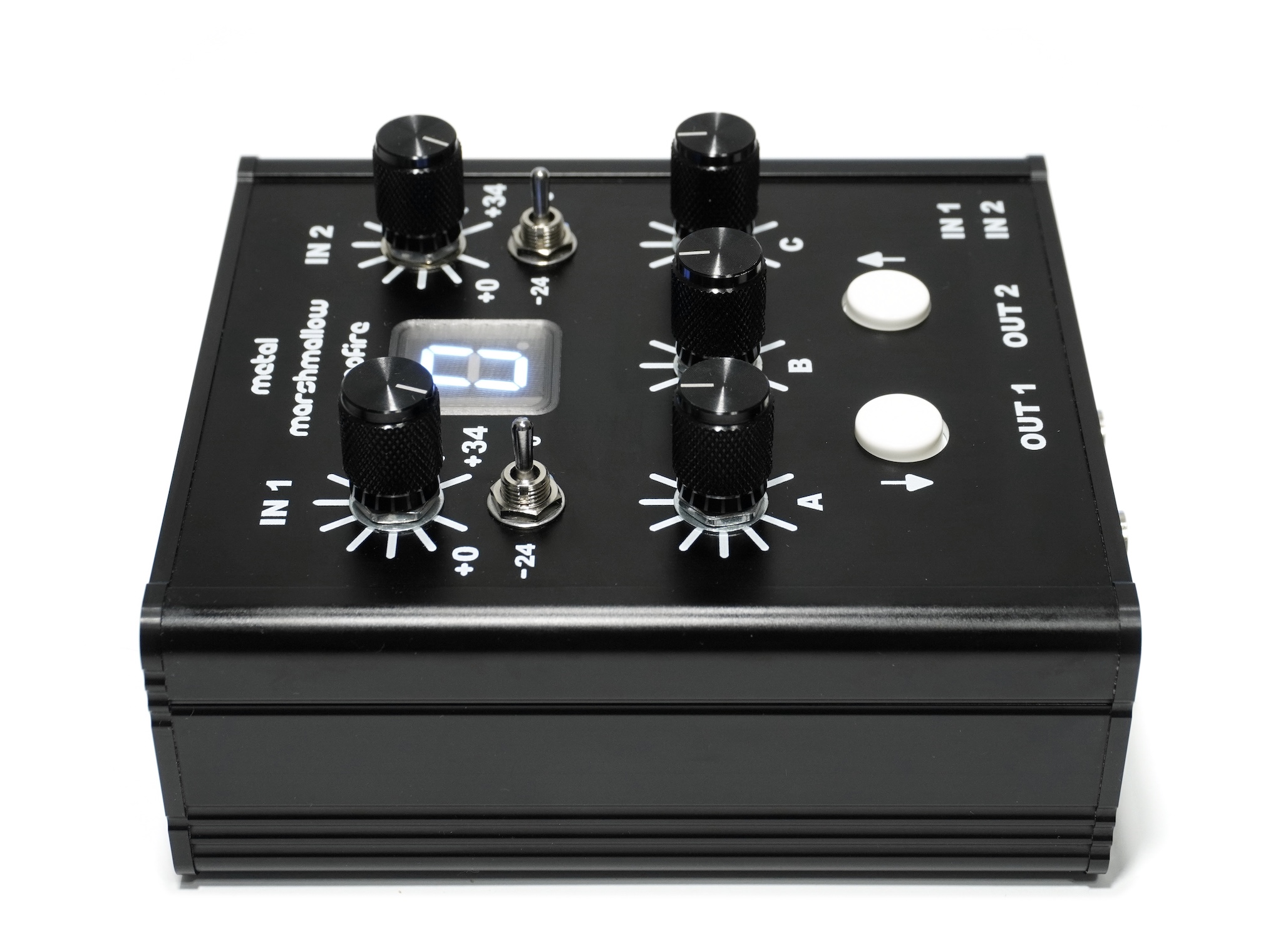
Metal Marshmallow Campfire is a stereo programmable digital effects processor for contact microphones. It is like a guitar pedal on steroids, but for contact mics. It comes with 2 contact mic sensors that you can plug into it. It contains two built–in Metal Marshmallow contact mic preamps, which allow you to capture sounds from the sensors ranging from very loud to very quiet with exquisite detail and fidelity. It will digitize the audio from the mics and apply digital effects such as reverb, distortion, chorus, delay, pitch–shifting, etc to the sound. It will then convert the audio back to analog before sending it out the outputs. Campfire stores 16 effects at a time, 8 of which can be reprogrammed. The effects processing is done with a chip called Spin FV1, which is widely used in guitar pedals. There already exists a large corpus of third-party effects available for this chip which can easily be loaded onto Campfire using
a simple web–based interface. Advanced users can write their own effects and load them onto the device using an open–source toolchain.
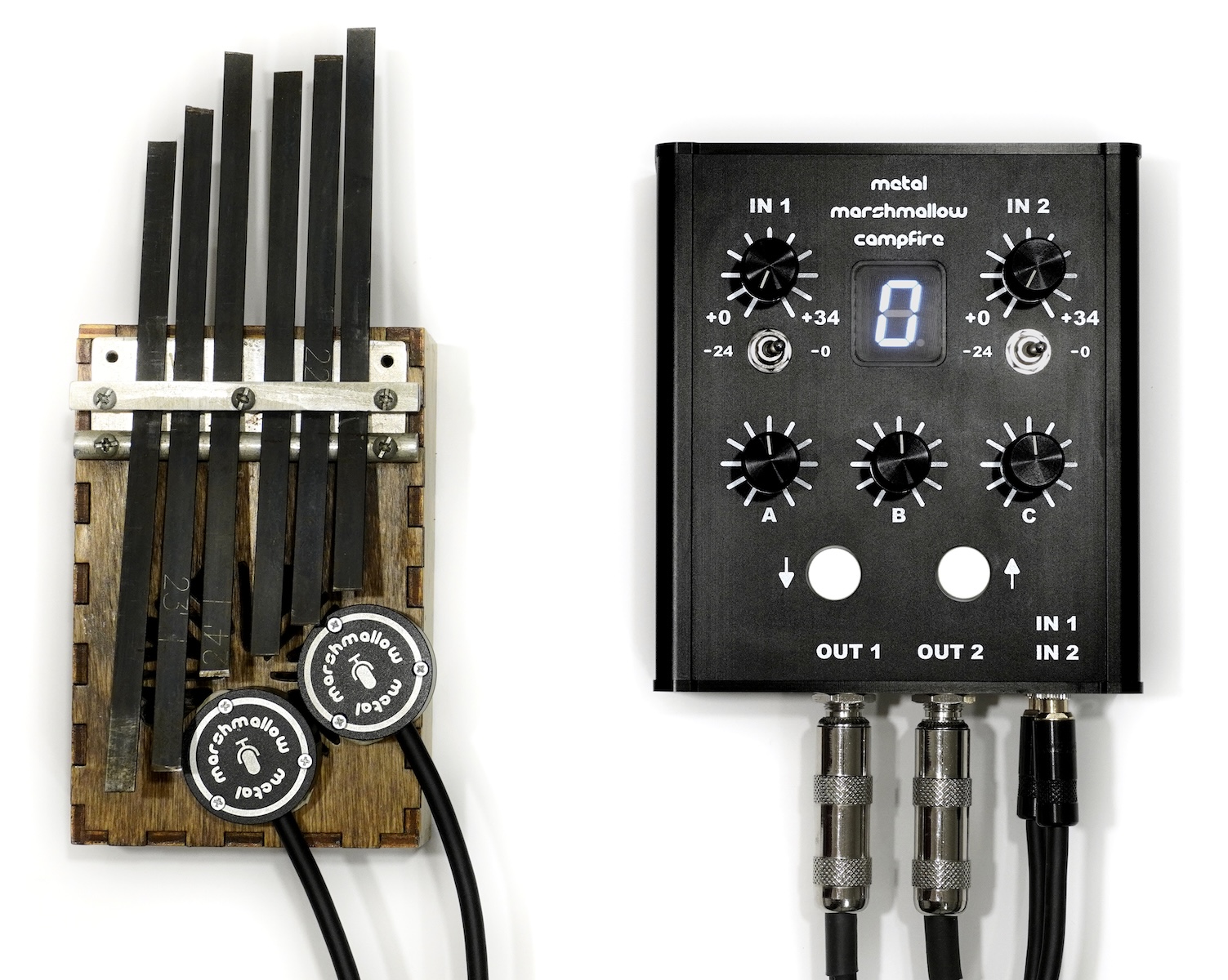
Metal Marshmallow Campfire was designed for all of the musicians and sound artists who over the years have asked me how to run their acoustic instrument through guitar pedals for live performance. I have previously made videos and blog posts showing workarounds, but I have never had a perfect solution. Campfire is the perfect solution. Just stick some contact mics to your instrument and plug them into Campfire. Now you have unlimited effects at your fingertips, or you can use Campfire as a mixer to route sound out into other pedals and effects processors. Campfire is also great for recording, sound installation art, sound design, and anything else that needs to sound awesome!
Features
- 2 contact mic inputs
- 2 instrument level outputs
- 2 built–in Metal Marshmallow contact mic preamps
- 16 built–in digital effects, 8 of which are reprogrammable
- 48kHz 24–bit Audio
- USB–powered or battery–powered operation (battery not included)
- Built–in battery charger
- Fun for the whole family!
- Slices, dices, even makes Julienne fries!
- What the heck is Julienne fries?
Included
- 1x Metal Marshmallow Campfire Digital Effects Processor
- 2x Metal Marshmallow Morsel Contact Mic Sensor
- 1x USB–C Wall Charger
- 1x USB–C Cable
Note that this does not include a battery, audio cables, speakers, rusty mbira of death, etc. You can select the style of charger you want from a drop down menu at the bottom of this page. There are US, UK, EU, and AU chargers. When you view your cart prior to checking out, you can double check the SKU number, which will end in US, UK, EU, or AU to indicate the style of charger you will receive.
Anatomy
1. Top
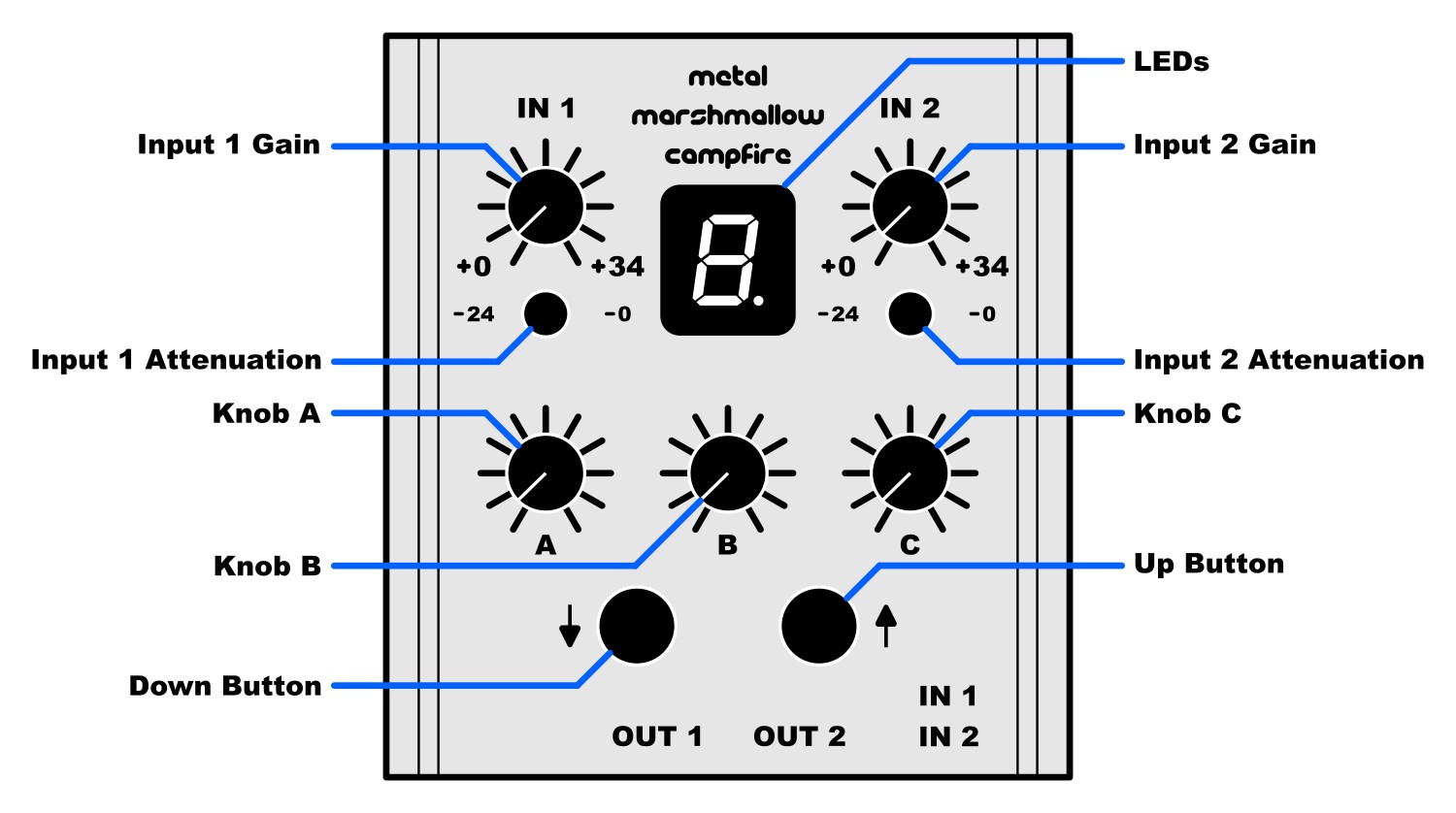
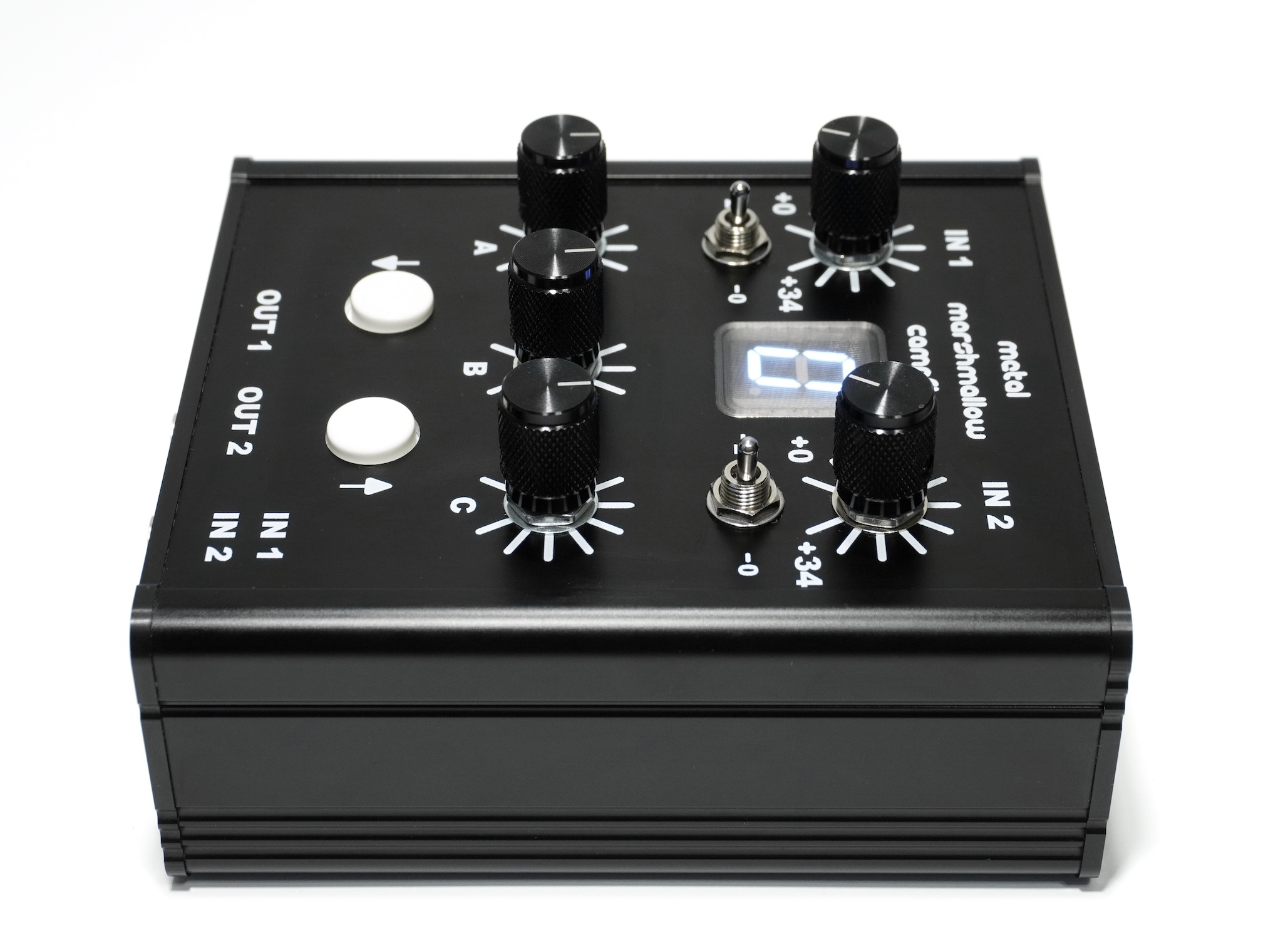
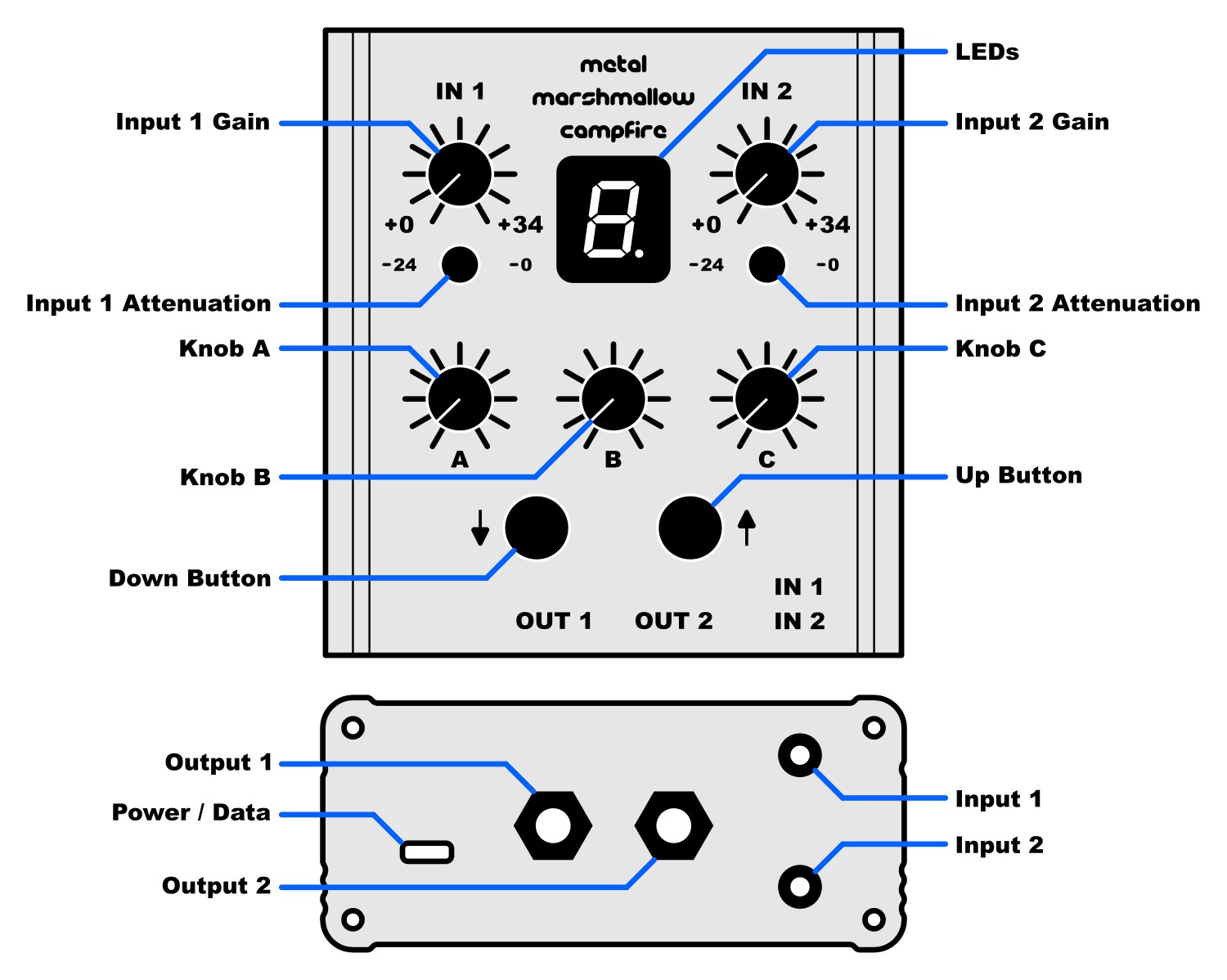
- LEDs: The 7–segment (plus dot) numeric display shows useful information about the device, including the currently selected program, the clip status, and the battery status.
- Input 1 Gain, Input 2 Gain: These knobs adjust the sensitivity of the contact mic inputs 1 and 2 respectively. They range from 0dB (fully antoclockwise) to +34dB (fully clockwise) of gain. High gain allows you to capture very quiet sounds.
- Input 1 Attenuation, Input 2 Attenuation: These switches select the attenuation level for contact mic inputs 1 and 2 respectively. They are either 0dB (switched right) or −24dB (switched left). −24dB allows you to capture very loud sounds.
- Knob A, Knob B, Knob C: These knobs adjust the digital effects parameters. Their exact operation depends on the currently selected effect.
- Down Button, Up Button: These buttons are used to turn the device on and off, select an effect, and display the battery status.
2. Front
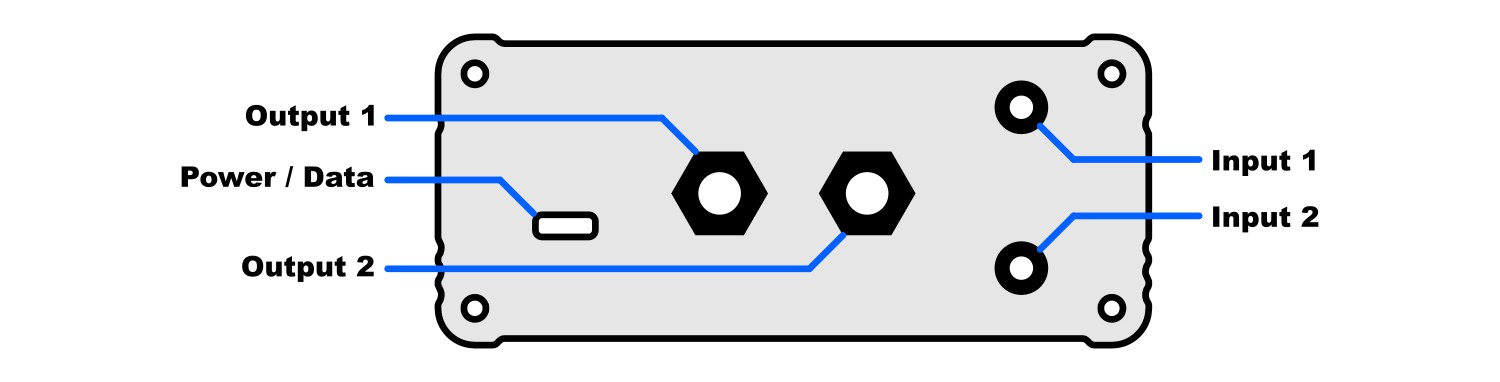
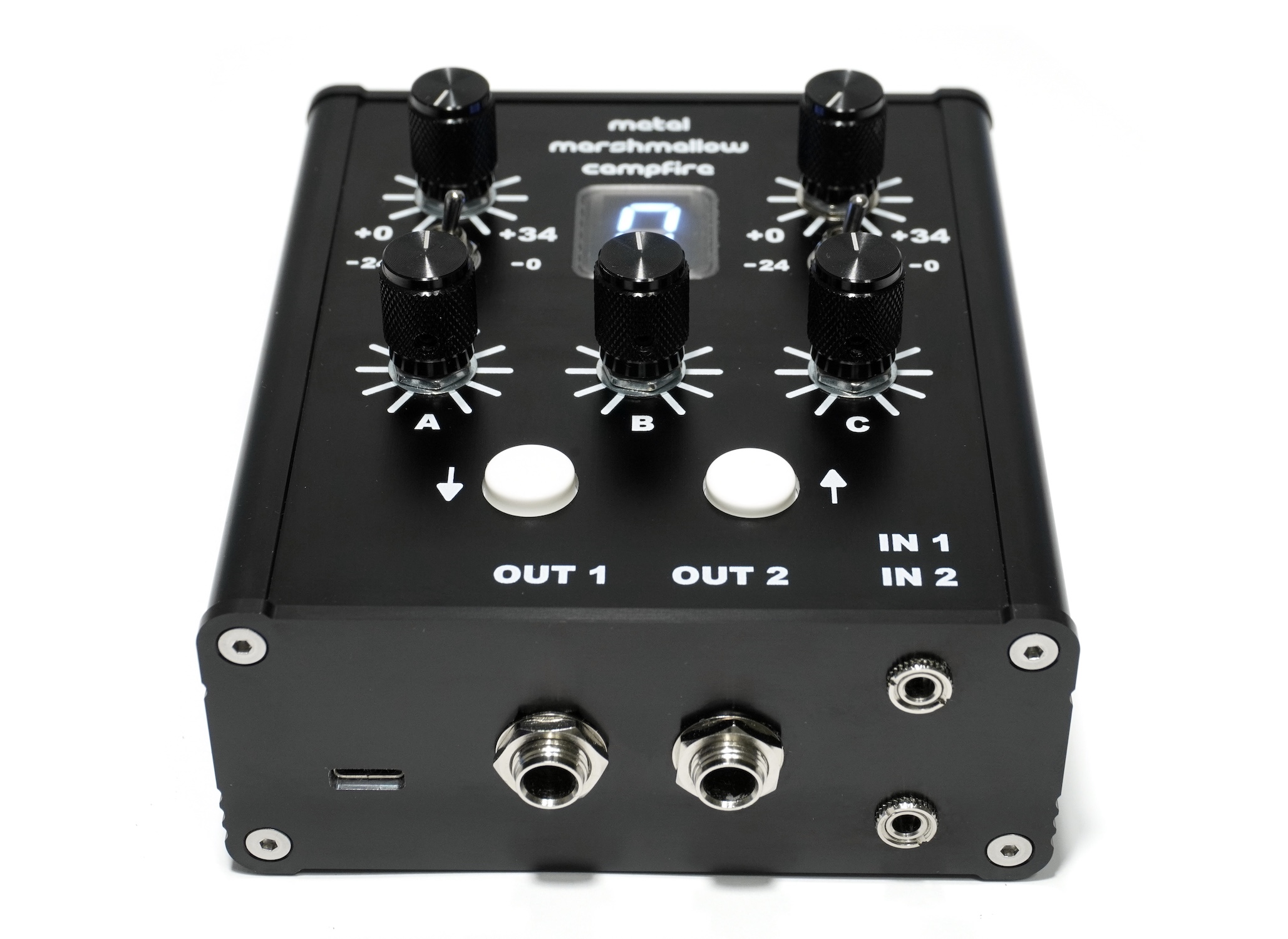
- Output 1, Output 2: Audio output from the device. These are unbalanced 1/4 inch instrument–level outputs. They can be plugged into guitar pedals, guitar amplifiers, or instrument inputs of mixers or audio interfaces. Whatever these are plugged into should have an input resistance of at least 10kΩ, otherwise Campfire&apos output drivers could be overloaded, resulting in distortion.
- Power / Data: This is a USB–C compatible port. It is used to power device, charge the battery if one is present (not included), and to load new effects onto the device. Campfire is not an audio interface and digital audio is not streamed through the USB–C port.
- Input 1, Input 2: Contact microphone inputs into the device. These are 3.5mm differential contact mic inputs. Plug the provided Metal Marshmallow Morsel contact mic sensors into these. Do not plug other audio sources into these, they output a small voltage that could damage other audio sources.
Basic Operation
- To turn the device on, apply power using the included USB charger, or by installing a battery (not included) as described in the Battery section below. Press and hold both buttons for about 1 second. When the device turns on, the LEDs will light up and the device will start processing audio.

- The up and down buttons can be used to cycle between the 16 stored effects. The LEDs will display a number (0–9) or letter (A–F) corresponding to the currently selected effect.
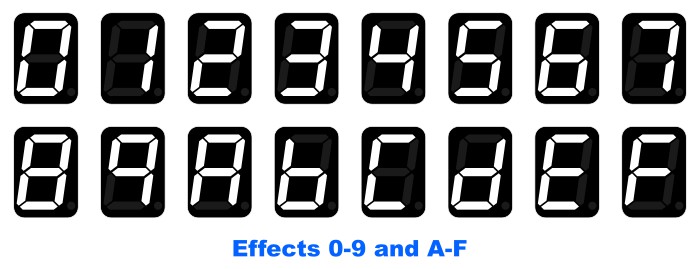
- The dot on the lower right corner of the LEDs serves as a clip indicator. It will light up briefly if either audio input or either audio output exceeds the maximum level. More information about using this to fine–tune your setup is in the Setting Levels section below.

- To view the battery status, press and hold both buttons. Two vertical lines means no battery is installed. 1, 2, or 3 horizontal bars indicates low, medium, and high remaining charge, and a lit dot indicates that the battery is currently charging. Zero bars indicates that the battery is very low and the device operation will be unstable, and might shut itself off soon.
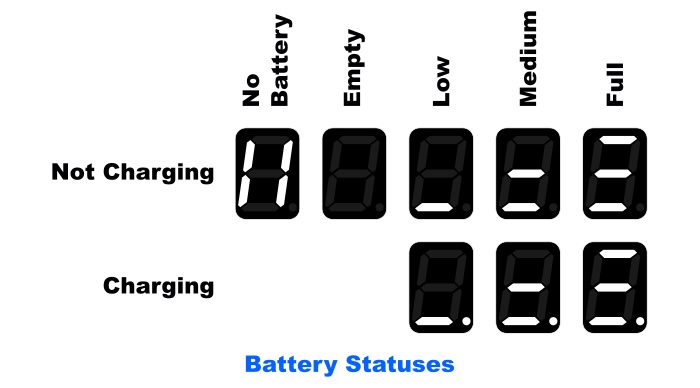
- To turn the device off, press and hold both buttons. The battery status will be displayed. Continue holding the buttons for 4 seconds and the device will turn off. The LEDs will turn off and audio will no longer be processed.

Setting Levels
Effect number 0 with knobs A, B and C fully counterclockwise passes the input through to the output with no effect applied. This is useful for setting the input gain of the contact mic preamplifiers. Start with the gain knobs and attenuation switches at 0dB. Attach the mics to your instrument, and plug only one of them into Campfire. Play as loud as you plan on playing while watching the clip-status indicator (the dot on the LEDs). Increase the gain until the clip indicator occasionally lights up, then reduce the gain slightly until it does not light up while playing. If the gain is at 0dB and the clip indicator lights up, flip the attenuation switch to −24dB and repeat. Unplug this mic and repeat for the other mic using the other input. This is the correct input level.
Later, if the clip indicator lights up while using other effects, it is because that particular effect has output gain grater than 1. That is common for delay-based effects where sound can accumulate over time, making the output louder than the input. If that particular effect has a gain control on knobs A, B, or C, use it to reduce the output gain. Otherwise, it might be necessary to further reduce the input gain to avoid overloading this effect.
Campfire's output is instrument–level, and it does not contain a power amplifier. Consequently, none of the knobs are generally suitable for controlling the overall loudness of your instrument in the mix during live performance (although certain effects could implement a digital output attenuation feature that could allow fine-tuning). This should be done further down the line with a mixer, a volume knob on active speakers, or similar.
Battery
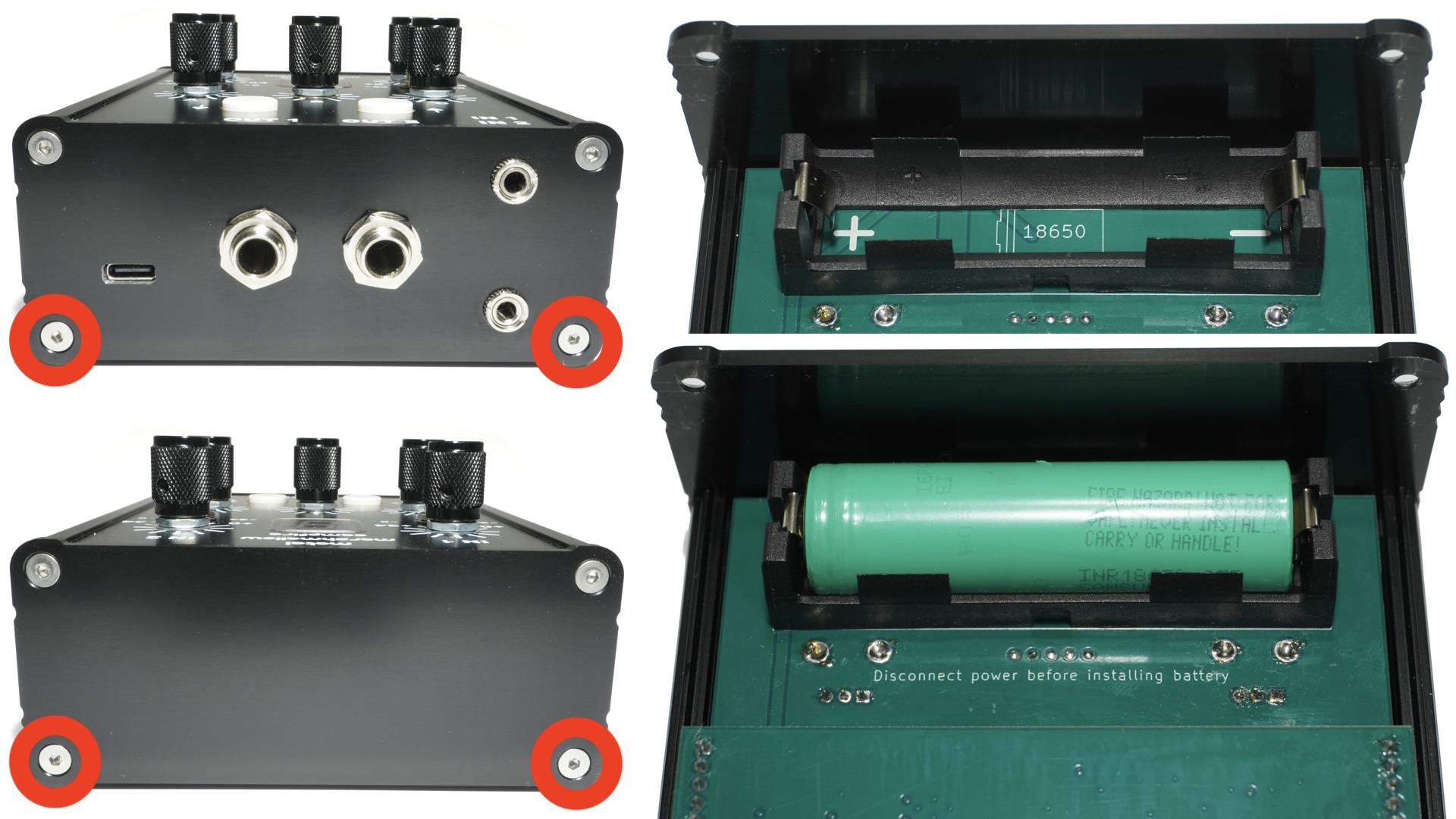
Campfire can be powered with a standard 18650 Lithium battery. Only a standard 65mm long battery will fit in the receptacle, meaning it should have a flat top (not a button top) and no protection (the protection circuit is built into Campfire). One with 2500 mAh capacity will work well. Due to shipping restrictions, one is not included in the device. One can be installed using the following procedure.
1. Installation
WARNING: LITHIUM BATTERIES ARE MUCH MORE DANGEROUS THAN ALKALINE BATTERIES. SHORTING THE TERMINALS OR INCORRECTLY INSTALLING THE BATTERY WILL START A FIRE THAT CANNOT BE PUT OUT WITH A FIRE EXTINGUISHER. IT IS RECOMMENDED TO HAVE A LICENSED TECHNICIAN INSTALL THE BATTERY.
- Disconnect USB power prior to starting this procedure.
- Use a 2mm hex key (not included) to remove the 4 screws nearest the bottom of the device.
- The large bottom section of the housing can then be slid off. This exposes a battery holder on the bottom of the circuit board.
- Place an 18650 battery into the battery holder, paying close attention to the polarity.
- The positive terminal of 18650 batteries are usually marked with a line or groove inscribed around that end. The end with the marking should face the + sign next to the battery holder.
- While campfire does contain reverse–polarity protection circuitry, it is not recommended to test this circuitry by installing the battery backwards, it will upset the Gods. If you cannot figure out which side of the battery is positive, stop and take it to a technician.
- When a battery is first installed, it will probably be locked out and will not power the device. To unlock the battery, plug the USB charger into the device for a couple of seconds. After this, the battery will power the device on its own, provided that it is sufficiently charged.
- Re–assemble the housing and screws.
- Battery can be charged using the provided USB wall adapter. Battery will charge with device on or off.
2. Charge and Discharge Times
The following was observed with a 2500 mAh battery.
- Device operates for around 28 hours on a single charge
- Battery takes around 8 hours to charge from empty to full. (Please don't be mad at me.) This is because the device is USB 2.0 compatible and needs to stay within the 500 mA limit.
- A smaller–capacity battery may be used.
- A larger–capacity battery may be used, but the built–in charger times out after 10 hours, so two charge cycles may be required to bring the battery from empty to full.
A battery that has been discharged beyond normal usage might not be detected, causing the battery status to show | |. The battery will nonetheless trickle charge and will be detected the next time the device is powered off.
Programming It
Effects in slots 0 to 7 are fixed and cannot be changed. Effects in slots 8 to F can be read and written using the
Campfire Programmer web–based software accessible via this link, or by navigating to Widgets→Campfire Programmer using the menu of this website. The software does not work in all browsers, but works on Chrome on OSX, Windows, and Linux. There are 4 different ways of programming effects onto the device.
1. Read and Write
Effects can be transferred from the device into the software. This allows you to swap existing effects into different slots, and transfer them back onto the device in the new order. This functionality can also be used to transfer programs between two Campfires.
2. Select from List
The software contains a large library of pre-compiled third–party effects that are compatible with Campfire. Any of these can be selected from a list, loaded into any slot 8 to F, and transferred onto the device.
3. Upload from Computer
If you already have a compiled Spin FV1 effect that you obtained from your own source, you can upload it into the Campfire Programmer software into any slot 8 to F, and transfer it on to the device.
4. Write your Own
You can write your own effects using an open-source toolchain. Effects are written in the SPINAsm assembly language.
The SPINAsm language is documented here
The code can be written into any standard text editor. Once the code is written, it needs to be assembled. This can be accomplished with
The official Spin Assembler (IDE – Windows Only)
The asfv1 open-source assembler (CLI – Windows, Mac, and Linux)
The assembler will output a .bin file 512 bytes in length. This file can be uploaded into the Campfire Programmer software into any slot 8 to F and transferred onto the device. (Effects cannot be transferred onto Campfire directly from within the Spin IDE).
A description of the default programs that come on a new Campfire are described in more detail
in a separate blog post.
Tech Specs
- Size (housing only): 114 x 106 x 96 mm
- Size (including knobs and connectors): 125 x 106 x 63 mm
- Weight: 430g, Campfire only, no battery
- Current (Max): 500 mA
- Battery Charge Current (Max): 350 mA
- Device Operating Current (Max): 150 mA
- Device Operating Current (Typical): 85 mA
- Current While Off: 190 μA
- Battery Lockout Current: 60 μA
- Output Impedance Level: Instrument
- Output Voltage Level: +4 dBu
Video
Watch on Youtube